Map Tracker & Location Share
- 4.6
- Rating
- 10.00K
- Installs
- Free
- Price
 Analysis by App-foxy
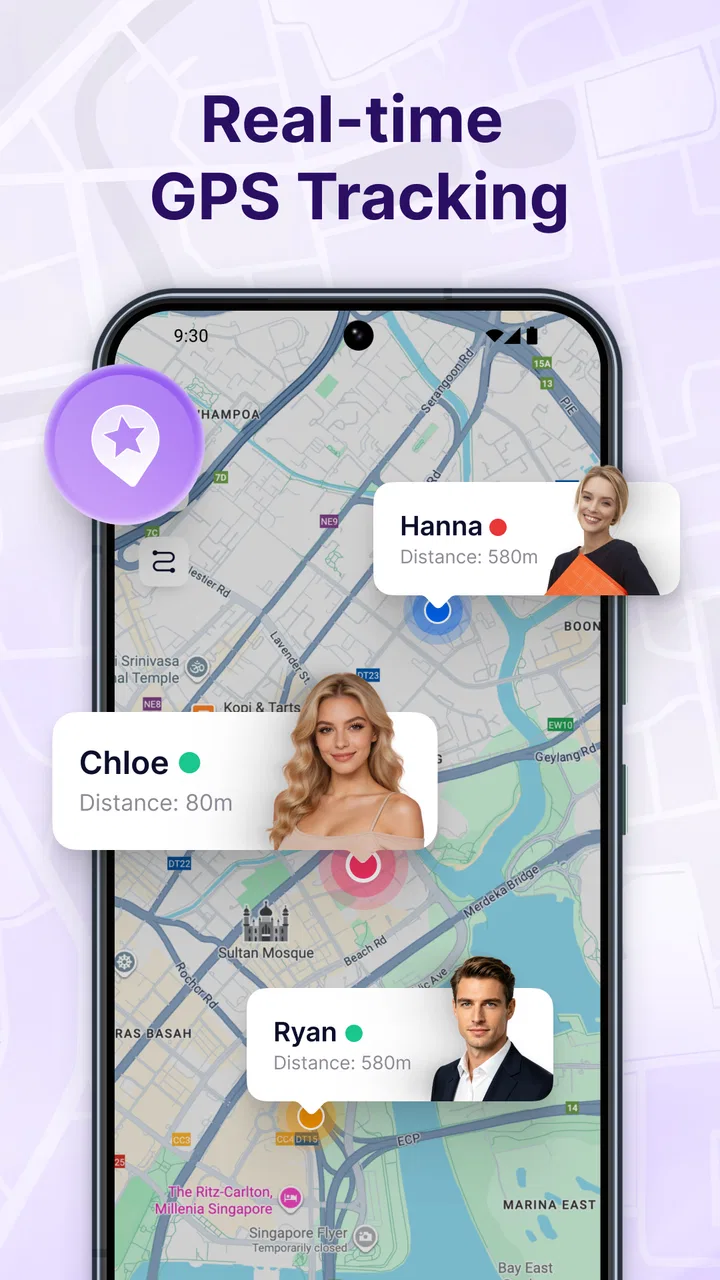
I approached Map Tracker & Location Share as a practical navigation companion rather than a full replacement for a large mapping platform. Its purpose is easy to understand: share your live position with friends and receive alerts when someone arrives or leaves. That focused idea makes it appealing for everyday coordination, especially when a group needs to know where people are without sending a stream of messages.
The app sits in the Maps & Navigation category and is free to use. It comes from HuanYoung Tech of SZ, carries an Everyone age rating, and runs on Android 7.0 or later. The current release is version 1.1.2. Those details matter because this is the kind of tool people may want to install on an older spare phone, a family member’s device, or a budget handset used mainly for communication and location sharing.
My overall impression is that the app is most useful when the question is not “How do I get there?” but “Where is everyone right now, and has anyone arrived?” That distinction shapes both its strengths and its limitations. It can simplify meetups and arrival monitoring, but people looking for turn-by-turn navigation, transit planning, saved places, or a broad travel toolkit will probably feel more comfortable with a conventional maps service.
You May Also Like

 AccuWeather: Weather Radar
AccuWeather Review: A Quick, Clear Forecast for Everyday Decisions
For everyday plans, the best forecast is the one you can understand quickly. AccuWeather makes rain timing, radar, and local conditions easy to act on, with a few trade-offs.

 Hill Climb Racing
Why Hill Climb Racing Still Turns Crashes Into One More Run
A tiny car, a bumpy hill and one more upgrade: Hill Climb Racing keeps resurfacing because its simple chaos makes every near-miss feel personal.

 AliExpress - Shopping App
AliExpress Makes Global Shopping Feel Personal, but Shoppers Bear the Risk
AliExpress turns a global marketplace into a pocket-sized discovery engine. Its reach is useful, its shopping loop compelling, and its trade-offs easy to miss.

 Lords Mobile: Kingdom Wars
Lords Mobile Is a Kingdom-Building Routine, Not a Quick Match
A case-by-case verdict on the building, battles, device demands, and social commitments that make Lords Mobile rewarding for some players and exhausting for others.

 PDF Scanner app - TapScanner
TapScanner Makes Paperwork Easier to Capture, Check, and Share
TapScanner makes scanning with a phone feel less like a rescue operation and more like a dependable step in getting work done. Its capture tools are useful, though not flawless.

 Block Blast!
 Shows How Much a Puzzle Game Can Leave Out
A quiet grid game shows why puzzle players increasingly value instant clarity, repeatable skill and low-pressure play—and where the genre still needs to catch up.
More From Our News Desk
View All News


How Map Tracker feels during everyday use
I find Map Tracker most useful when a group has a clear, short-term reason to keep tabs on progress, rather than as something to leave running by default. That distinction matters because live location can feel reassuring during a pickup but intrusive once the task is over. I’d treat the first check as a chance to agree on who is sharing and what the alert should help everyone decide.
Speed expectations for a focused location tool
A small, clearly defined app has an advantage: there is less to distract from the central task. When I open a location-sharing tool, I want to reach the map and the relevant person quickly, not work through layers of travel recommendations, business listings, or route options. Map Tracker’s concept is well suited to that kind of direct interaction.
The practical speed of a live location app depends on more than the application itself. The phone needs a usable connection, location services need to be available, and the person being tracked must be sharing their position. If one of those links is weak, the map may appear less current even when the app itself feels responsive. I would therefore judge it by how quickly it helps me check a situation, not by expecting a perfectly continuous movement trail.
There is also a useful difference between checking a location and waiting for an arrival alert. A map view can answer an immediate question, while an alert is more valuable when I am doing something else. For example, if a friend is coming to meet me, I would rather prepare coffee or finish a task than repeatedly refresh a map. The arrival and departure focus gives the app a more practical role than simple manual location sharing.
One tip I would use is to agree on the purpose of sharing before starting. A short meetup, a family pickup, and a long journey do not require the same attention. If everyone understands whether the app is being used for a single arrival or for ongoing coordination, there is less chance of leaving a sharing session active longer than intended or misreading an old position as a current one.
What happens during heavier use
The app becomes more interesting when several people are coordinating at once. A group leaving a concert, a family meeting at an unfamiliar park, or friends arriving separately at a restaurant can all benefit from a shared view. In these situations, the main challenge is not drawing a map; it is keeping the information understandable when several locations and arrival states change close together.
I would use it in a simple sequence. First, I would create or join the relevant sharing situation, then confirm that the intended people are visible, and finally rely on the arrival or departure notifications instead of constantly asking for updates. That workflow reduces message clutter. It also makes the app useful for people who are not comfortable explaining their location in words.
A less obvious use case is coordinating a handoff. Imagine one person bringing keys, documents, or a child’s school bag to another person who is travelling across town. The sender can watch for movement and arrival rather than guessing whether the meeting has already happened. This is not a replacement for calling someone when timing is urgent, but it can reduce unnecessary back-and-forth in ordinary situations.
Heavy use can also expose the trade-off between convenience and attention. More people on a map may make the shared view more informative, but it can also create confusion if nobody has agreed on labels, destinations, or the meaning of an alert. I would keep groups small and purposeful. For a large event, a group chat or event-planning service may remain better for announcements, while this app handles the narrower location question.
Another practical tip is to treat alerts as prompts, not guarantees of physical contact. An arrival notification can tell me that someone reached a location, but it does not confirm that they found the correct entrance, saw my message, or are ready to meet. For important pickups, I would still combine the alert with a quick call or message.
Reliability, interruptions, and recovery
Location sharing is only useful when people can understand what the app is showing after an interruption. Phones move between Wi-Fi and mobile networks, screens are locked, batteries run low, and users may accidentally close an app or change a setting. A reliable experience is therefore not just about receiving an update; it is also about recovering sensibly when an update is delayed.
My advice is to check the situation before relying on it for anything time-critical. If a friend’s marker has not changed for an unexpectedly long period, I would not immediately assume that person is still in the same place. I would consider connectivity, battery level, and whether sharing is still active, then contact them directly if the decision matters.
This recovery habit is especially important for departure alerts. A departure can be useful when monitoring a child leaving school or a guest starting a journey, but it should not replace a clear plan. If the alert arrives late, the information may still be helpful, yet it may no longer be precise enough for a tight appointment. The app is better suited to awareness and coordination than to emergency-grade monitoring.
I also like the idea of using a quick confirmation routine. Before someone sets off, both people can check that the right sharing session is open and that the destination or meeting point is understood. After arrival, the recipient can respond normally rather than assuming the notification has solved every part of the meeting. This small routine makes the app more dependable because it prevents a technical signal from carrying more responsibility than it should.
For privacy and social comfort, I would be selective about who receives a location. Live position sharing can feel intrusive when it is left running without a clear reason. The best experience comes from using it with people who already understand the arrangement, for a task with a defined purpose, and with a clear end point in mind.
Device constraints and everyday resource choices
Because the app supports Android 7.0 and newer, it can fit a wider range of phones than many modern-only tools. That is helpful for households with mixed devices. An older phone may still be perfectly adequate for checking a shared map, although the overall experience can depend on the handset’s age, network connection, and location hardware.
Live location work naturally asks more from a phone than reading a static note. GPS or other location services, network communication, map rendering, and notifications all contribute to the workload. I would not describe this as a reason to avoid the app, but I would avoid treating an older phone with a weak battery as a dedicated tracker for a long day without preparation.
A sensible setup is to charge the phone before a trip, keep the operating system in a stable condition, and avoid testing the arrangement for the first time during an important journey. On a spare device, I would do a short trial with a trusted contact. That test can reveal whether the phone displays the map comfortably, whether alerts are noticed, and whether the user understands when sharing is active.
The minimum operating-system requirement is also useful when deciding whether to install it on an old handset. If the phone is below Android 7.0, it is not the right candidate. If it meets the requirement but has limited storage, a crowded background workload, or an unreliable connection, I would still expect more friction than on a newer everyday phone.
There is a broader trade-off here. A lightweight location-sharing app may be easier to understand than a large navigation suite, but it does not remove the underlying demands of live location services. The phone still needs to know where it is and communicate that information. The app can organize the experience; it cannot make a dead battery or absent signal disappear.
Where it beats ordinary alternatives
Compared with sending a one-time location pin through a messaging app, Map Tracker is better suited to situations where movement and arrival matter. A static pin tells me where someone was when they sent it. An ongoing shared view and arrival or departure alerts are more useful when people are travelling separately or when I do not want to ask for repeated updates.
Compared with a full navigation app, its advantage is focus. Traditional map services are usually stronger for route planning, traffic context, place discovery, walking directions, and public transport information. If I am driving to an unfamiliar address, I would choose one of those tools first. If I already know the destination and mainly need to coordinate people, the narrower design of this app may be less distracting.
Compared with a family-safety platform, the decision is less straightforward. A dedicated safety service may offer a broader set of monitoring and household-management controls, while Map Tracker is attractive when I want a simpler location-sharing purpose. I would choose the focused app for a meetup or temporary coordination task, and a more specialized service when a family needs a larger, ongoing safety system.
One non-obvious strength is that arrival and departure alerts can change the rhythm of a group. Instead of one person acting as the dispatcher, each participant can use the shared information to make their own decision about when to leave, wait, or prepare. That can be more comfortable than repeatedly requesting “Where are you?” updates, especially when everyone is busy.
Who will get the most from it
I can recommend this app to friends who often arrange informal meetups, coordinate pickups, or travel to the same place from different starting points. It is also a reasonable option for people who find full map platforms overwhelming and want a more direct way to see shared movement. The free price removes an obvious barrier for trying it with a trusted group.
The store presence is still relatively modest, with over ten thousand installs and an average rating of 4.6 from around three dozen ratings. I would read that as encouraging early feedback rather than proof that it has been tested by every kind of user or phone. The small review count means I would personally trial it before making it central to a complicated travel routine.
I would skip it if my main need is navigation itself. It is not the app I would open first for a multi-stop road trip, detailed walking directions, transit changes, or discovering places nearby. I would also avoid depending on it alone for emergencies, strict appointment timing, or situations where a delayed update could create danger.
It may not suit users who dislike location sharing on principle. Even when the feature is useful, the social agreement matters as much as the interface. Everyone involved should know who can see the location and why. If that conversation feels uncomfortable, a one-time message or ordinary phone call may be the better choice.
My performance verdict
Map Tracker & Location Share works best as a focused coordination layer between a messaging app and a full navigation service. Its perceived speed should be good for quick checks when the phone and connection are behaving normally, while its most valuable contribution is reducing the need for constant manual updates. The arrival and departure concept gives it a clear reason to exist.
The main limitations are tied to the nature of live location rather than to the idea itself. Network conditions, battery, device age, and user habits can all affect how current and useful the information feels. I would prepare the phone, test the sharing routine, keep groups purposeful, and use direct contact whenever timing or safety is critical.
For a free Maps & Navigation app from HuanYoung Tech of SZ, the current version 1.1.2 presents a straightforward proposition: help friends coordinate movement and notice key transitions without turning every meetup into a conversation full of status updates. My recommendation is positive for temporary, everyday location coordination, but conditional for anything that demands guaranteed real-time precision. If that is the problem you are trying to solve, this app is worth trying; if you need a complete map and travel toolkit, choose the broader alternative instead.
FAQs for Map Tracker & Location Share
01What is Map Tracker & Location Share used for?
Map Tracker & Location Share is designed to help users share their current position and follow the locations of selected contacts on a map. It can be useful for coordinating meetups, keeping family members informed during trips, or checking whether someone has reached a destination. Its usefulness depends on accurate GPS, an active internet connection, and the permissions granted to the app.
02Does Map Tracker & Location Share track my location continuously?
The app may use location services while you are actively sharing your position, depending on the tracking mode and permissions selected on your device. Before enabling sharing, review whether access is allowed only while using the app or in the background. Continuous tracking can also increase battery consumption, so it is sensible to stop a sharing session when it is no longer needed.
03Can I choose who sees my location?
Location sharing should be treated as a permission-based feature rather than something to enable indiscriminately. You generally need to select or invite specific contacts, and you can usually stop sharing when circumstances change. Before using the app, check the recipient list carefully and review any links or invitations you send, because anyone who receives access may be able to view your location for the duration of the session.
04Does Map Tracker & Location Share work without an internet connection?
GPS can determine your approximate position without mobile data in some situations, but sharing that position with another person normally requires an internet connection through Wi-Fi or cellular data. If connectivity is weak, the map may display an outdated location or update slowly. For reliable use, make sure location services are enabled, the app has the required permissions, and your phone can access the internet.
05Is Map Tracker & Location Share free to download and safe to use?
The app may be available at no initial download cost, although some features can depend on advertising, optional purchases, or subscription terms shown in the store listing. Safety also depends on how you configure location permissions and whom you invite. Download it from the official Android or iOS store, review the privacy policy, avoid sharing access with unknown people, and disable tracking when you no longer need it.
Pros
- Real-time location sharing helps groups coordinate during trips and meetups.
- Supports location tracking for family members with clear map visualization.
- Useful route history can help review previous journeys and visits.
- Simple interface makes core tracking features easy to find and use.
- Location links can make sharing your current position more convenient.
Cons
- Continuous GPS use may noticeably reduce battery life during long tracking sessions.
- Location accuracy can drop indoors or in areas with weak network coverage.
- Some features may require subscriptions or in-app purchases.
- Sharing precise locations raises privacy concerns if permissions are mismanaged.
- Background tracking may stop when battery-saving settings restrict the app.

Map Tracker & Location Share
Gallery